Yep as others have noted put a \ in front of each special character. The \ tells the system to treat the following character as a alphanumeric character in the string and not as a operator or a command. Since ', $ and \ are all special characters you will need a \ just before each when typing this name. Also as mentioned do this with a benign command like ls first to make sure your only acting on that specific directory or you might have a bad day.
Edit: How the heck did you get some of those folder names? Looks like a script with incorrect variable/macro substitution made these.
Oh that is unpleasantly fiddly to insert all the backslashes to escape the bits. Testing here, (fiddly to even make a dir called that, lol), for fun, instead of just pressing tab, … is it just the $ and the \ you need to escape? and the ’ are fine? Results here are inconclusive, not sure I managed to make a file with the same name, it showing here with extra outer '.
Probably easier to just interactively… but yeah, in case needing to have it written for a script… probably easiest still to just press tab, to see how it arranges the escape syntax, and paste that into your script. ;)
The fi in fish is friendly interactive, after all.
you can escape special charcters with \ something like \'folder\'\$\'\\003\' might work
be careful with rm -rf as you might delete your entire disk if done badly. use some other command to test if it targets the correct directory like ls \'folder\'\$\'\\003\'


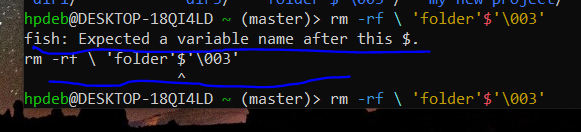
‘folder’$‘\003’
That’s the name of the folder.
Yep as others have noted put a \ in front of each special character. The \ tells the system to treat the following character as a alphanumeric character in the string and not as a operator or a command. Since ', $ and \ are all special characters you will need a \ just before each when typing this name. Also as mentioned do this with a benign command like ls first to make sure your only acting on that specific directory or you might have a bad day.
Edit: How the heck did you get some of those folder names? Looks like a script with incorrect variable/macro substitution made these.
Oh that is unpleasantly fiddly to insert all the backslashes to escape the bits. Testing here, (fiddly to even make a dir called that, lol), for fun, instead of just pressing tab, … is it just the $ and the \ you need to escape? and the ’ are fine? Results here are inconclusive, not sure I managed to make a file with the same name, it showing here with extra outer '.
Probably easier to just interactively… but yeah, in case needing to have it written for a script… probably easiest still to just press tab, to see how it arranges the escape syntax, and paste that into your script. ;)
The fi in fish is friendly interactive, after all.
What does
lsshow?you can escape special charcters with
\something like\'folder\'\$\'\\003\'might workbe careful with
rm -rfas you might delete your entire disk if done badly. use some other command to test if it targets the correct directory likels \'folder\'\$\'\\003\'