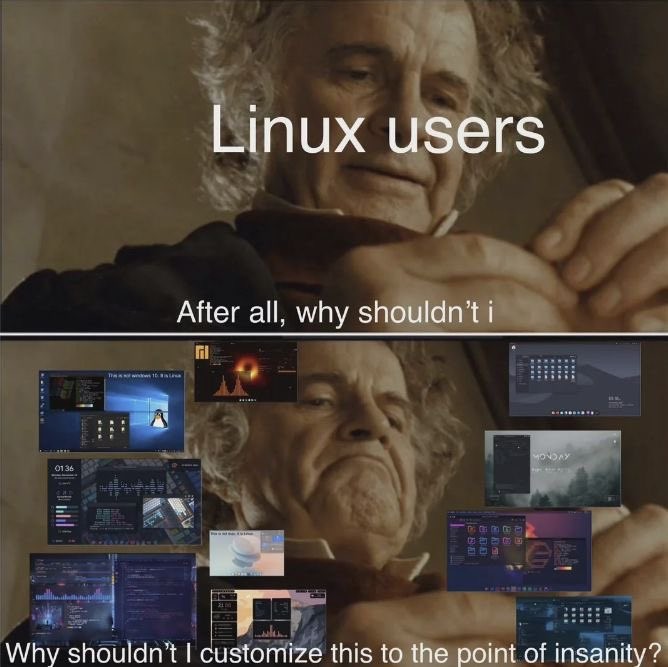
Some people want to remove bloat to have a more efficient system
Some people want to remove bloat so they can fill it up again with their own bloat
They are not the same
It’s not bloat if you want it
Time you enjoy wasting, is not wasted time.
One man’s bloat is another’s treasure
One man’s waste is another man’s soap.
Son’s fanbase know the brother-man’s dopeReminds this one of a nord from Whiterun.
don’t love your desktop bloat, bloat your desktop love
Whatever bloats your boat.
Insert two wolves meme here
Im actually going for the Gus fring one
Yes but I am both
Inside of you are two Gus Frings
They are not the same
I’m the second part of this statement and I don’t like it.
hey, all that processing power used to layer three layers of differently tinted slightly differently translucent blurred windows with rounded corners are WORTH IT.
EDIT : after all, you need it to run a terminal based browser.
Ah but you see, this is my bloat! 😂
I love that many of the pictures in the bottom are from Rainmeter. A software for Windows that allows you to place customised widgets anywhere. So… literally have nothing to do with Linux
Man, you have a lot of confidence in your ability to tell Rainmeter apart from Conky, Eww or the like, from just a handful of pixels…
Let’s just say I’ve used Rainmeter a lot. And by a lot i mean for about 20 years. Is it possible people have created replica themes on Conky or viseversa on Rainmeter? For sure. I just found it funny that the image included Rainmeter skins. They’re the kind of images you’ll see as the poster for certain themes. And I’ve scrolled through more of them than I’d like to admit. And many of them are reposted a lot but use the same poster/thumbnail
It’s just so fun having an OS that you can make work for you vs being shoehorned into things you never asked for.
You may see insanity, I see home.
No place like
/home/$USER!What is wrong with
$HOME?
deleted by creator
thats the beauty of it, is it not? having your OS fit SPECIFICALLY you and your needs. i am now so used to my setup that i fell like i will get an aneurysm when trying to use windows… or a DE on Linux
Customization is and always will be a key selling point of Linux, that’s why I refuse to recommend any district with gnome as DE.
You got to recommend what fits the user. Otherwise you are just telling them what fits you.
It’s all fun and games until you have to actually maintain everything as time goes on. At some point the tradeoff in personal time becomes too great.
My ricing days are long gone. Now I just roll with the defaults and adjust the key bindings since my muscle memory has already hardened into diamonds.
…but I actually like GNOME!
There are quite a few customization options for it too.
deleted by creator
Me too. I recently switched from NixOS to Fedora workstation because I didnt have the energy anymore to maintain my config. And all my kubernetes stuff got shoved in proxmox lxcs via the community scripts.
I almost spit out my coffee. Thanks!
Finally KDE will allow us to save our custom desktop layout. I might spend all my weekends customising my setup from now on.
How so? I want KDE to remember that certain programs should only open on certain screens
How so? I want KDE to remember that certain programs should only open on certain screens
KDE has been able to do this for a long time.
System Settings --> Window Management --> Window Rules
Or, right click on the title bar of the window --> more options --> configure special window settings
From there, you can create a rule that forces a certain program to open its window at a certain location. And you can specify that location to be on the screen you want it to be on. Specifically set a rule for “Position”, enter the screen coordinates where you want it to go, and select “Apply Initially”.
(If the application isn’t behaving under that rule, try adding the “Ignore requested geometry” rule as well.)
Thank you very much!
They just release a new version. Most distro should offer it soon. Not sure it will do what you ask tho, maybe with Activities?
Bloat isn’t “software I chose and spent time installing and configuring”
But it can be “software I forgot I installed and consumes resources despite me not really using it”
True, and that’s a bad practice to take part in! If it’s something that actively runs and consumes resources, one should keep around only if needed.
Hey, it’s not bloat if you want it!
deleted by creator
I found a thread on reddit where some doofus was claiming the classic cube layout from Compiz is completly useless and nothing more than eye candy after someone was having trouble with setting up the cube on Wayfire.
It is objectively the best way to handle multiple workspaces.
I slightly customized my KDE taskbar by centering it with panel spacers because that was the only thing i liked about Win11. Set it to auto-hide for OLED reasons. I dont remember if the slightly floaty style was standard with my distro or i did it?
Then like two tweaks to dolphin to make it look more like the ‘detailed’ view in windows explorer which is the only legit way to view files. Everybody else with these giant folders is fucking crazy. Probably the only thing where i’m not open minded.
Uh, yeah thats it. Havent changed anything else in almost two years on two different distros.
Then like two tweaks to dolphin to make it look more like the ‘detailed’ view in windows explorer which is the only legit way to view files. Everybody else with these giant folders is fucking crazy. Probably the only thing where i’m not open minded.
I’m among the few who general use / game on linux in the living room on a TV sitting on the couch at a distance, and I still rather use detailed view lmao. Hard agree.
Everybody else with these giant folders is fucking crazy.
Hey, man. Sometimes I’m dealing with images a lot, and it helps to have image thumbnails big enough to see clearly.
(And even the mini-thumbnails inside a folder’s thumbnail are visible enough to be helpful, giving me a quick sense of what’s in that folder.)
Yeah, thumbnails plus the details panel on the side is way more useful information for me than the list view. If I just wanted a list I wouldn’t be using a graphical file manager in the first place
Eh, list has its place, and I’ll still use it sometimes.
List shows you more files on one screen, and it can show details of the files like filesize and last modified date without having to click on each file to get that.