xkcd 242 obviously
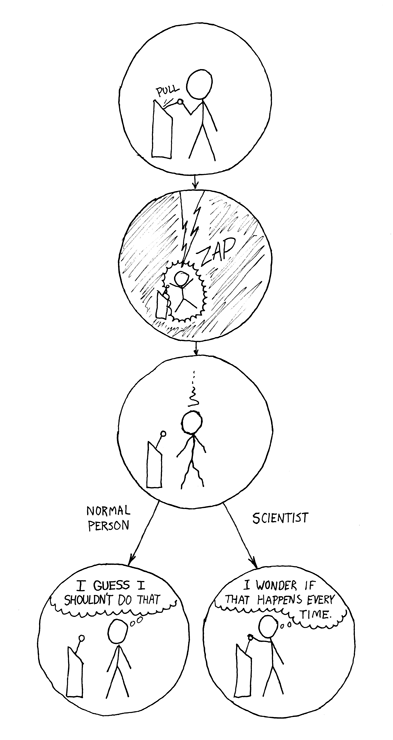
I feel called out. I’m not sure which way I’d go.
Get somebody else to pull it.
For science.
Me playing point and click games
You know what this is based AF because if you don’t do it a second time how would you know if it wasn’t a weird edge case or a race condition or maybe you just didn’t internalize the cause and effect because you weren’t looking for it until a bug appeared
You make a change. It doesn’t fix it.
You change it back. The code now works.
the real fix was the journey, the destination never mattered
The usual for me is that I flip back over to my editor and hit ctrl+save, cause heaven forbid I ever remember to do that before running.
I have no regrets from setting my editor to save-on-blur
The first one is to warm up the engine. Like getting your car ignition to kick over in the winter
and sometimes that’s exactly what’s needed. Services wake up, connections get established and then when you try again things are up and it works.
Trying to debug race conditions be like
Yuuup… Debugging concurrent code is a bitch.
Code doesn’t work; don’t know why.
Code works; don’t know why.
Cargo Cult Programming is bad.
The absolute worst thing that can happen is if it suddenly starts working without doing anything
Sweet, push to production.
You jest but “wait and retry” is such a powerful tool in my DevOps toolbox. First thing I tell junior engineers when they run across anything weird
Honestly, in DevOpS, when you’re running stuff in a GitHub Action/Azure DevOps Pipeline/Jenkins, yeah… sometimes a run will fail for no obvious reason.
And then work the next time (and the next 100+ times after that) when you haven’t changed a damn thing.
“Maybe if we ignore the problem, it will go away”
You know, youve gotta give your computer some warmup.
The error message goes stale when it’s been sitting for a while. I need to see a fresh one.
Not sure which is worse. When you know you changed nothing and it inexplicably starts|stops working compared to yesterday
Far worse, and this applies to more than programming. If something is broken, I want it to be consistent. Don’t fix yourself, or sort of work but have a different effect. Break, and give me something to figure out, damn it.
Ah, come on this is valid investigation.
If you get the same error every time, you know you can find it and debug it, somewhat with ease.
If you don’t, you might have a thornier issue at hand.
I hate how stupid and obvious this is, but we all do it at least once if the compile is short. But with a 20 min compile, I am investigating.
This would be more mockable if it didn’t often WORK.
Running the code again is fast and requires no thinking. Finding the problem is slow and requires a lot of thinking.
It’s worth looking under the light-post in case your keys somehow rolled there. Just not for long.
I started coding professionally using Visual Basic (3!). Everybody made fun of VB’s
On Error Resume Next“solution” to error handling, which basically said if something goes wrong just move on to the next line of code. But apparently nobody knew aboutOn Error Resume, which basically said if something goes wrong just execute the offending line again. This would of course manifest itself as a locked app and usually a rapidly-expanding memory footprint until the computer crashed. Basically the automated version of this meme.BTW just to defend VB a little bit, you didn’t actually have to use
On Error Resume Next, you could doOn Error Goto errorHandlerand then put theerrorHandlerlabel at the bottom of your routine (after anExit Sub) and do actual structured error handling. Not that anybody in the VB world ever actually did this.